
Web Application Firewall · In-stack
One WAF for any platform — WordPress, WooCommerce, PHP, Node & APIs — under one dashboard.
Domain Dome installs inside every client site you build and maintain — WordPress and WooCommerce today, custom PHP, Node, and APIs coming soon — all managed from one dashboard.
Runs inside your site — not a proxyNo DNS changesNo extra network hopFails open — never takes your site down
Why you need a WAF
AI changed how websites get built — and how they get attacked.
The same speed that puts a site live in hours is now aimed at breaking into it.
AI builds sites in hours.
AI turned weeks of work into hours. More websites are going live than ever — many built by people who never had to learn security.
Nearly half of AI-written code ships with a known flaw.
AI hunts for weaknesses, too.
The same tools serve the other side. Automated bots roam the web around the clock, quietly checking every site for a way in — yours included.
Bad bots are now 40% of all web traffic.
AI-aware defense, inside every site.
Domain Dome knows what AI-driven and bot attacks look like and blocks them the moment they arrive — before your app ever runs.
Every release clears 2,200+ automated security tests before it ships.
Sources: Veracode, Thales/Imperva — 2026.
Domain Dome is built to recognize AI-driven and bot attack patterns and block them as they happen — with detailed insights and alerts across every site you manage.
One core, every platform
Ten sites. Five platforms. Zero consistency.
A WordPress site here, Node.js there, custom PHP, WooCommerce, an API or two. Each with its own security plugin, its own login, its own way of doing things. One change across all of them means logging into every control panel you manage — one at a time.
northwind-blog.comWordPressFirewall pluginshop.brightleaf.comWooCommerceEdge proxymeadowclinic.orgWordPress2FAledger.harbourco.netCustom PHPNo pluginapp.tidewell.ioNode.js.env rulesapi.tidewell.ioAPIsAPI key only
One core engine. One policy. One dashboard.
Domain Dome runs the same in-stack WAF core inside every site, whatever it’s built on — a thin adapter per platform, one policy language, one central dashboard. Change a rule once; it rolls out across every site you manage.
WordPress and WooCommerce are live today. Custom PHP, Node, and APIs are coming soon — same core, same dashboard.
How it works
Install in minutes. Protect when you’re ready.
01
Start in your dashboard.
Create your account. Download the plugin and copy your site key from the onboarding page.
02
Install and connect.
Drop it in like a plugin or middleware, paste your key, and the site pairs with your dashboard. No DNS changes.
03
Monitor.
First the firewall watches every request and reports what it would have blocked. Full visibility, nothing blocked yet.
04
Protect.
One switch. The managed ruleset plus your own custom rules, enforced — attacks blocked before they reach your app.
05
Scale.
Add the next site — any platform, same dashboard — and bring it under the same policies from day one.
The fair question
Why wouldn’t I just use the free stuff?
You should ask. Here’s the honest math.
vs Cloudflare
Cloudflare has a free tier. Why do I need you?
Cloudflare Free is the perfect layer to run in front of Domain Dome — it absorbs DDoS and bot floods at network scale. What it doesn’t include is the managed WAF ruleset. That’s the Pro plan, at $20 per site, per month.
Cloudflare Pro$20 /site/moDomain Dome$4.17→$1.50 /site/moThe more sites you enroll, the lower the rate.
Core ruleset live today · full parity coming soon
vs Wordfence
Wordfence already works. Why switch?
Wordfence Free does work — but its firewall rules and malware signatures arrive 30 days after paying users get them, and country blocking isn’t included. Closing that gap means Premium, billed per site, every year.
Wordfence Premium$149 /site/yrDomain Dome$50→$18 /site/yrThe more sites you enroll, the lower the rate.
Rules update in real time — on every plan
The short answer
So why do I need Domain Dome?
It runs inside every site you manage, on any platform — seeing what the edge can’t and covering more than one site at a time. All from one dashboard: no separate logins, no policy to rebuild per site, no upsell.
And on security, don’t take our word for it —2,200+automated security tests every release must pass before it shipsFull report and methodology coming soon.
30 days free — full access
Competitor pricing as of July 2026; check current rates.
The in-stack difference
Inside your stack — not in front of it.
Edge WAFs and CDNs are good at what happens before traffic reaches your server — volumetric DDoS, caching, network noise. Domain Dome works at the layer they can’t reach: in-process, with full application context. Different layers, different jobs.
How a proxy WAF works
VisitorsProxy / edge layer3rd-party serversYour site
The edge layer: in front of your server, built for scale.
How Domain Dome works
VisitorsYour siteDomain Dome agent · reads in context
Domain Dome: inside the app, built for context.
| Edge / proxy WAFperimeter | Domain Domein-stack | |
|---|---|---|
| Where it runs | At the network edge, in front of your origin | Inside your app’s process |
| Best at | Volumetric DDoS, CDN scale, network-level noise | App-layer attacks: injection, login abuse, vulnerable dependencies |
| App context | Sees traffic patterns | Sees the request and the app it’s about to hit |
| Sees what’s installed | No — it runs outside the app | Runs where plugins and versions are visible |
| Setup | DNS cutover per site | Drop-in install per site — no DNS |
| Works together | ✓ Keep your CDN or edge WAF | ✓ Designed to run behind one |
Already on Cloudflare? Keep it. Domain Dome runs behind any edge and covers what it can’t see.
One dashboard
Every site. One command center.
Not a dashboard for a proxy — a control plane for firewalls running inside every site you manage. One login for the whole fleet.
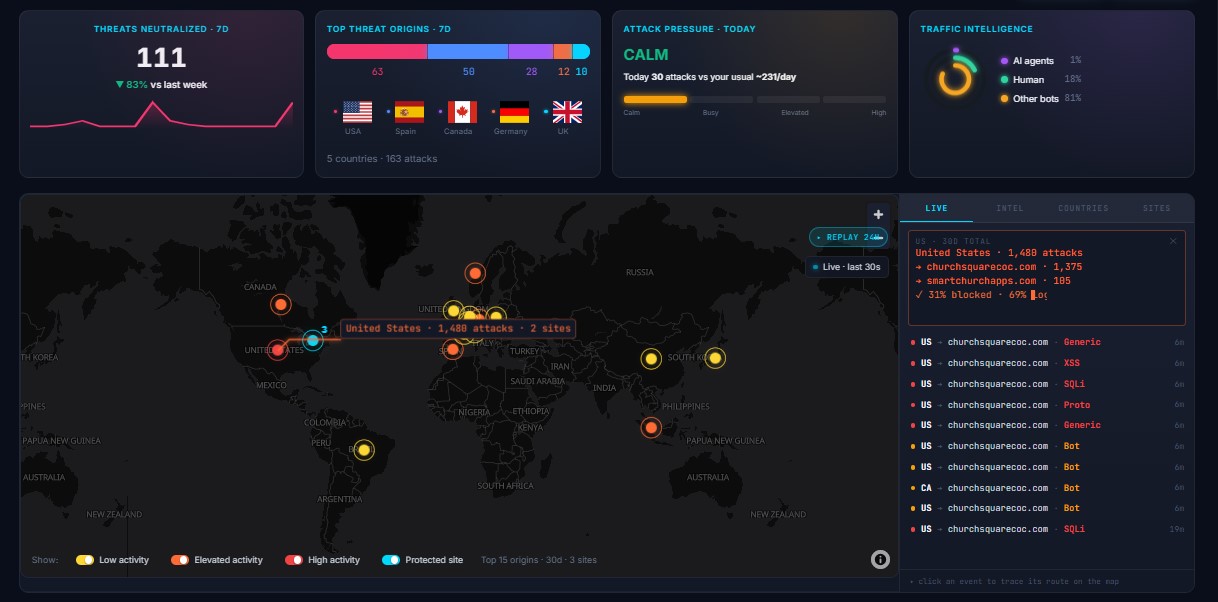
Fleet at a glance
Sites protected, attacks blocked, source countries. One map, one KPI strip.
Set policy once
Apply rules fleet-wide or per site. Stage rollouts from monitor to protect.
One live event feed
Every block, every site, one stream. Click any event to drill into the site.
For developers, freelancers & agencies
Security, built for web professionals.
Make protection part of what you sell, at a margin you set. The monthly security report does the talking with your clients.
Every client site’s security, run from one dashboard.
Your name on every block page — clients see you protecting them.
Fail-open by design — a WAF fault never takes a client site down.
Request blocked
This request was identified as a potential threat and stopped before it reached the site.
 · Managed by [Your Agency]
Capabilities
A complete WAF. Not a plugin with a few rules.
Everything below ships in the same install.
Five-stage request pipeline
Normalize → evaluate → decide → enforce → telemetry. OWASP CRS-based inspection for SQLi, XSS, LFI/RFI before your app runs.
Bot & AI-attack defense
Classifies and blocks automated clients — scrapers, scanners, credential bots.
Brute-force & login protection
Rate-limits login endpoints, locks out credential-stuffing, optional two-factor login via authenticator app.
Geo-blocking & IP intelligence
Country rules, IP allow & blocklists, per-site rate limits.
Audited IP reveal
Visitor IPs stay hashed — even from us. When an investigation truly needs one, reveal it with one click, fully audited and auto-deleted on schedule.
Never locked out
Locked out by your own firewall? Never again. Disable it or clear lockouts remotely from the dashboard, or unlock your IP with one click in wp-admin.
Coming soon
Virtual patches that auto-update
Patch the vulnerable plugin from inside the site. A proxy can’t reach it; we run where it lives.
Coming soon
Vulnerability & malware scanning
Continuous scan of installed components against known CVEs, fleet-wide.
Any platform
One firewall. Any platform you build on.
A platform-agnostic core does the security work. A thin adapter binds it to each platform — WordPress and WooCommerce today, custom PHP, Node, and APIs coming soon.

One firewall at the center
One firewall at the center
One core firewall does the security work; a lightweight adapter connects it to each platform. New platform = new adapter — same protection, same dashboard.
Protect every site you manage.
Security shouldn’t cost more than the site it protects. Priced per site, like hosting — from $4.17 a month down to $1.50 as you add more.
30 days, full access